


Virtually staged listing photos are one of the fastest ways to make an empty (or under-furnished) home feel livable—without moving a single sofa. If you’ve seen a listing where furniture looks real but the room was actually vacant, you’ve likely seen a virtually staged image.
This guide explains what “virtually staged” means, where it shows up (MLS, portals, ads), how it differs from virtual renovation, the pros/cons for agents and sellers, and a checklist to keep results realistic and compliant.
If you’re deciding between virtual home staging, physical staging, or other marketing options, use the decision criteria below to choose what fits your listing, timeline, and budget.
What does “virtually staged” mean in real estate?
In real estate, virtually staged means the listing photos have been digitally edited to add furniture and decor (and sometimes minor accessories like rugs, lamps, and art) to help buyers visualize how a space can be used.
In other words: the room was photographed empty (or lightly furnished), and the staging was added afterward.
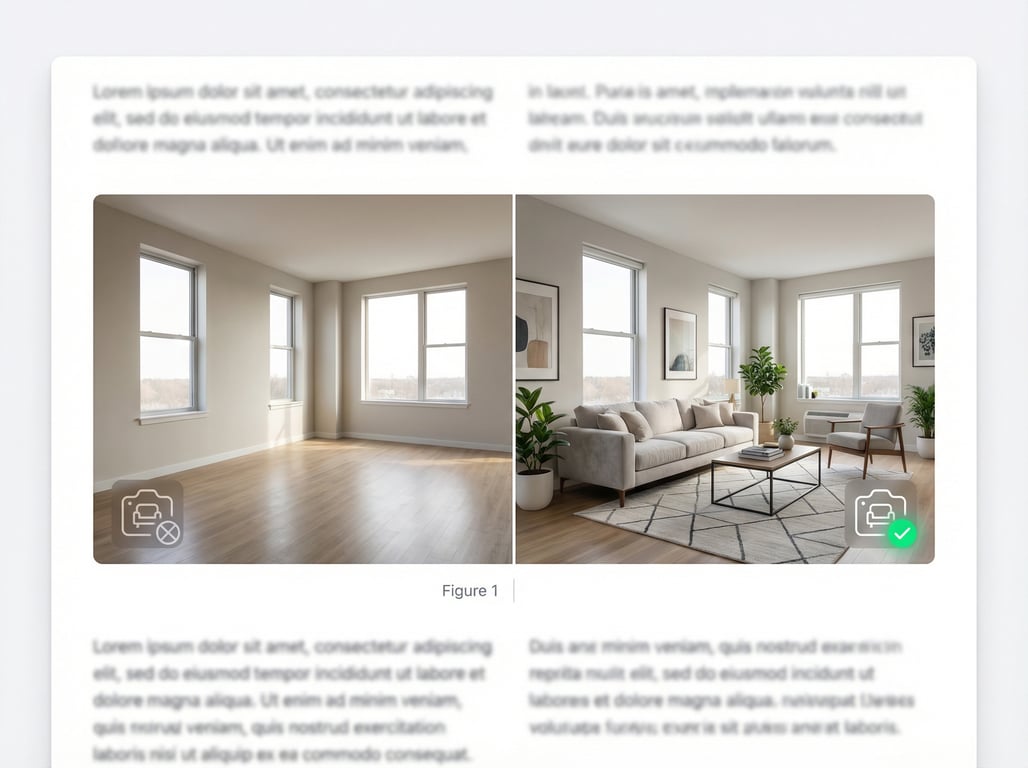
If you’re evaluating tools and workflows, see our guide to AI virtual staging apps for real estate agents for software options, turnaround expectations, and feature comparisons.
Definition (virtually staged vs. physically staged vs. empty)
Here’s a quick comparison you can use with sellers and teammates.
| Option | What it is | What changes | Best for | Watch-outs |
|---|---|---|---|---|
| Virtually staged | Digital furniture/decor added to a real photo | Furniture + decor only (ideally) | Vacant homes, tight timelines, budget control | Disclosure requirements, realism, buyer mismatch |
| Physically staged | Real furniture placed in the home before photography/showings | The actual space is furnished for photos and tours | High-end listings, luxury presentation, in-person wow factor | Higher cost, scheduling logistics |
| Empty / no staging | Photos show the space as-is | No edits | Investors, fixer-uppers, ultra-competitive pricing | Buyers may struggle to imagine scale/layout |
Common labels/disclosures agents use
Common, plain-language labels include:
- “Virtually staged”
- “Digital staging” or “Digitally staged”
- “Furniture added virtually”
- “Some images have been virtually staged”
Best practice: place the label in the photo caption and/or remarks, and keep it consistent anywhere the images appear.
Where it appears: MLS, Zillow/portals, brochures, social ads
Virtually staged photos commonly appear in:
- MLS photo sets (and syndicated portals)
- Zillow/Redfin-style portal galleries and captions
- Property websites and brochures
- Social ads (carousel images perform especially well)
Tip: if you mix staged and unstaged images, make the order intentional (e.g., lead with the best hero image, then show the empty version later for transparency).
When virtually staged photos work best (and when they don’t)
Virtual home staging shines when it helps buyers understand function and scale—without implying the property includes those items or has features it doesn’t.
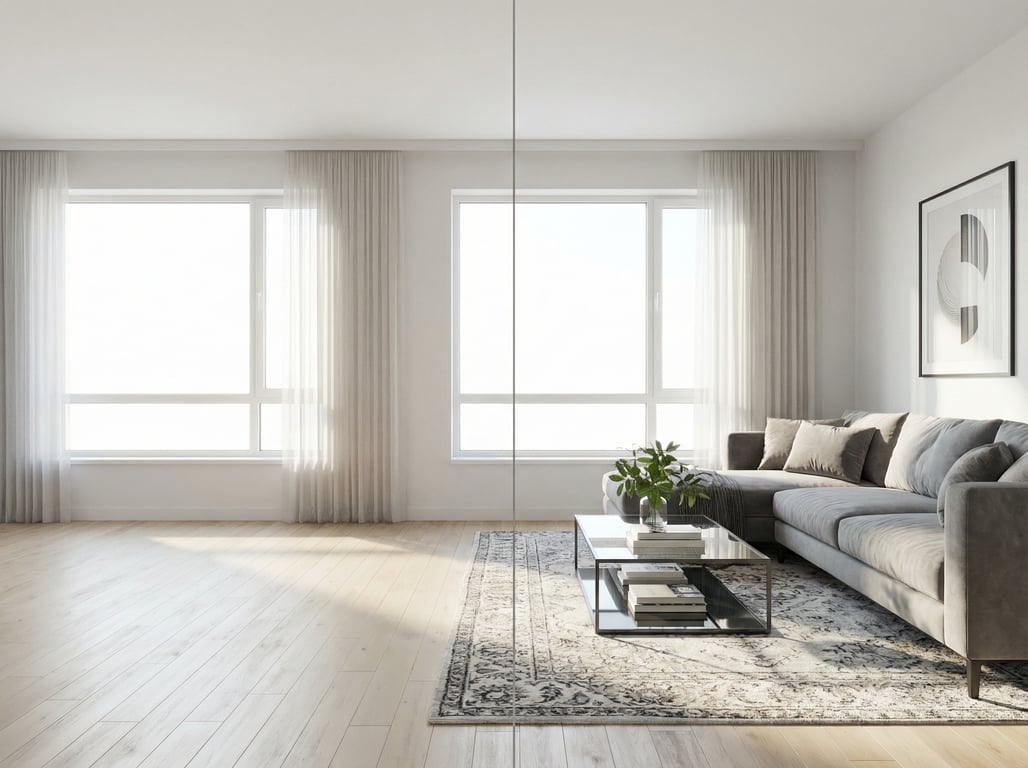
Empty homes and vacant rooms
Best use case: vacant listings.
- Adds warmth and context to large empty rooms
- Helps buyers read scale (so the living room doesn’t feel “smaller than it is”)
- Clarifies function (e.g., “this nook fits a desk”)
Outdated interiors that need modernizing
If the bones are good but finishes feel dated, virtual staging can support a “move-in ready vibe” by:
- Using modern furniture styles to reposition the room
- Keeping decor neutral so finishes remain visible
If the finishes truly need to be changed to tell the story, that’s often virtual renovation (covered below).
Awkward layouts (small bedrooms, narrow living rooms)
Virtually staged imagery can “solve” layout confusion by showing:
- Correct-size furniture (e.g., queen bed + slim nightstands)
- Clear walk paths
- A realistic TV placement or conversation area
The key is accuracy: oversized furniture is one of the fastest ways to lose trust.
When to avoid: severe disrepair, misleading structural changes
Avoid (or heavily limit) home staging virtual edits when:
- The home has major damage, safety issues, or missing surfaces
- The edit would hide defects that materially affect value
- You’re tempted to change structure (moving walls/windows, removing columns)
If the home needs real repair, use photos that set expectations—and price/remarks that match reality.
Virtually staged vs. virtual renovation: what’s the difference?
Both are photo-based visual marketing, but they’re not the same.
Staging (furniture/decor) vs. renovation (materials/finishes)
- Virtually staged: adds furniture and decor to demonstrate layout and lifestyle.
- Virtual renovation: changes finishes/materials (flooring, paint, cabinets, countertops) to show a remodel concept.
If you want examples and tools for concepting finishes, see AI room design (free) for real estate use cases.
Examples of edits that cross the line
Edits that commonly “cross the line” from staging into renovation (or misrepresentation) include:
- Replacing flooring in the image when the home still has old carpet
- Painting cabinets or changing countertops that aren’t being updated
- Removing power lines, cracks, stains, or visible damage
- Altering window sizes, ceiling height, or adding recessed lighting that doesn’t exist
General rule: staging shows how to use the space; renovation shows how you might change the space.
How to choose the right approach for a listing
Use this decision filter:
- Choose virtually staged if the space is in acceptable condition but needs help with layout, warmth, or scale.
- Choose virtual renovation if you’re marketing the potential of a remodel (and you can clearly disclose it as a concept).
- Choose both only if you can keep disclosures extremely clear and the intent is obvious (e.g., “rendering of possible remodel”).
Pros and cons for agents and sellers
Pros: faster listing readiness, broader buyer appeal, cost control
Benefits agents and sellers care about:
- Faster time-to-market (no delivery/pickup scheduling)
- Easier to test styles (modern, transitional, Scandinavian)
- Helps buyers imagine living there (especially online)
- Often cheaper than physical staging for many properties
This can be a strong middle option between hiring home stagers and going fully DIY. For alternatives, compare options in interior decorator vs. DIY vs. AI for listings.
Cons: disclosure risk, buyer mismatch, inconsistent lighting/scale
Common downsides:
- Disclosure/compliance varies by MLS/board and portal policies
- Buyer disappointment if the in-person experience feels “too different”
- Unrealistic shadows, warped perspective, incorrect scale
- Style mismatch (e.g., ultra-luxury furniture in a starter home)
How to mitigate: consistent angles, realism, minimal edits
Reduce risk and improve results:
- Stage only what you can defend as “decor/furnishings,” not structural changes
- Keep furniture scale conservative
- Match lighting direction and color temperature
- Use consistent camera angles across the set
- If you include both empty and staged, keep them paired and clearly labeled
Best practices checklist for virtually staged listing photos
Use this as a quick QA process before publishing photos to MLS/portals and ads. For additional seller prep steps beyond photos, pair this with our stage your house checklist.
Photo requirements (angle, exposure, resolution)
- Shoot level (avoid tilted verticals); keep lines straight
- Use consistent focal lengths across key rooms
- Expose for windows without making interiors muddy
- Start with high-resolution images (your editor can’t “add detail” later)
- Avoid extreme HDR artifacts (they make added furniture look fake)
Style selection by property type (starter home vs. luxury)
- Starter home: clean, simple, smaller-scale furniture; minimal decor
- Family home: emphasize seating capacity, dining functionality, storage cues
- Condo: space-saving layouts; avoid bulky sectionals
- Luxury: higher-end textures and cohesive design theme, but still realistic
Keep it realistic (scale, shadows, perspective)
A quick realism test:
- Do chair seats align with table height?
- Are rugs sized appropriately (not floating, not tiny)?
- Do shadows fall in the same direction as natural light?
- Are legs grounded (no “hovering” furniture)?
Show multiple options: neutral vs. bold (optional)
If you have time or a flexible seller:
- Create a neutral version for MLS
- Use a bolder concept for social ads (e.g., accent color, trend-forward decor)
This lets you keep MLS conservative while testing scroll-stopping creative.
Disclosure and compliance notes (MLS/board rules vary)
General, non-legal guidance:
- Add “virtually staged” wherever required (captions/remarks/photo label)
- Don’t remove permanent defects or misrepresent fixed features
- Keep a record of originals and edited versions
- When in doubt, choose the more transparent option (and ask your MLS/board for current rules)
Pricing: what does virtual staging typically cost?
Virtual staging pricing varies mainly by vendor quality, realism, and turnaround time.
Pricing models (per photo, bundles, subscriptions)
Common pricing structures:
- Per photo (most common)
- Bundles (e.g., 10–20 photos)
- Subscription plans (volume teams/marketing departments)
If you’re comparing software vs. managed services, revisit AI virtual staging apps for real estate agents to understand where DIY tools can reduce cost—and where they may add review time.
What impacts cost (complexity, turnaround, number of rooms)
Typical cost drivers:
- Faster turnaround (same-day/24-hour)
- Custom styles vs. template furniture libraries
- Complex spaces (open-concept great rooms, tricky lighting)
- Number of images and revision rounds
ROI framing for listing marketing
A practical way to frame ROI:
- Goal: improve click-through and showing requests by helping buyers “get it” faster
- Cost control: stage the highest-impact rooms first (see FAQ)
- Use staged photos as ad creatives even if MLS uses a mix of staged/unstaged
Key takeaways
- Include a clear, plain-language definition and quick comparison table (virtually staged vs physical staging vs virtual renovation).
- Use a compliance-friendly section emphasizing disclosures and avoiding structural misrepresentation; keep claims non-legal (general guidance).
- Optimize for commercial intent with decision aids: checklist, cost drivers, when-to-use scenarios.
- Add internal links to existing staging/AI room design posts to strengthen the cluster and distribute authority.
- Avoid duplicating the existing "stage your house" article by focusing on photo labeling/meaning/compliance + best practices for 'virtually staged' imagery.
FAQ
What does virtually staged mean?
It means the listing photo was digitally edited to add furniture and decor to an actual photo of the room (often photographed empty) to help buyers visualize layout and scale.
Do you have to disclose virtual staging in real estate photos?
Often, yes—many MLSs/boards and platforms require clear labeling. Use plain wording like “virtually staged” in captions/remarks, and keep original photos on file.
Is virtual staging allowed on MLS?
In many areas it is allowed with proper disclosure, but rules vary by MLS/board. Check your local policy for required labels and whether certain edits are prohibited.
How much does virtual staging cost per photo?
Pricing varies by quality and turnaround, but it’s commonly priced per image or in bundles. Cost increases with custom styles, complex rooms, and rush delivery.
Can virtual staging change walls, windows, or flooring?
That typically goes beyond staging. Changing walls/windows is a structural alteration and is usually inappropriate for “virtually staged” labeling; flooring changes are closer to virtual renovation and should be clearly disclosed as a concept.
What rooms should you virtually stage first?
Start with the rooms that drive clicks and showings: living room/great room, primary bedroom, and main dining area (or an eat-in kitchen space). Then consider an office/bonus room if it clarifies layout.